Kubernetes backup and recovery
Your namespaces and volumes, backed up to a bucket you own.
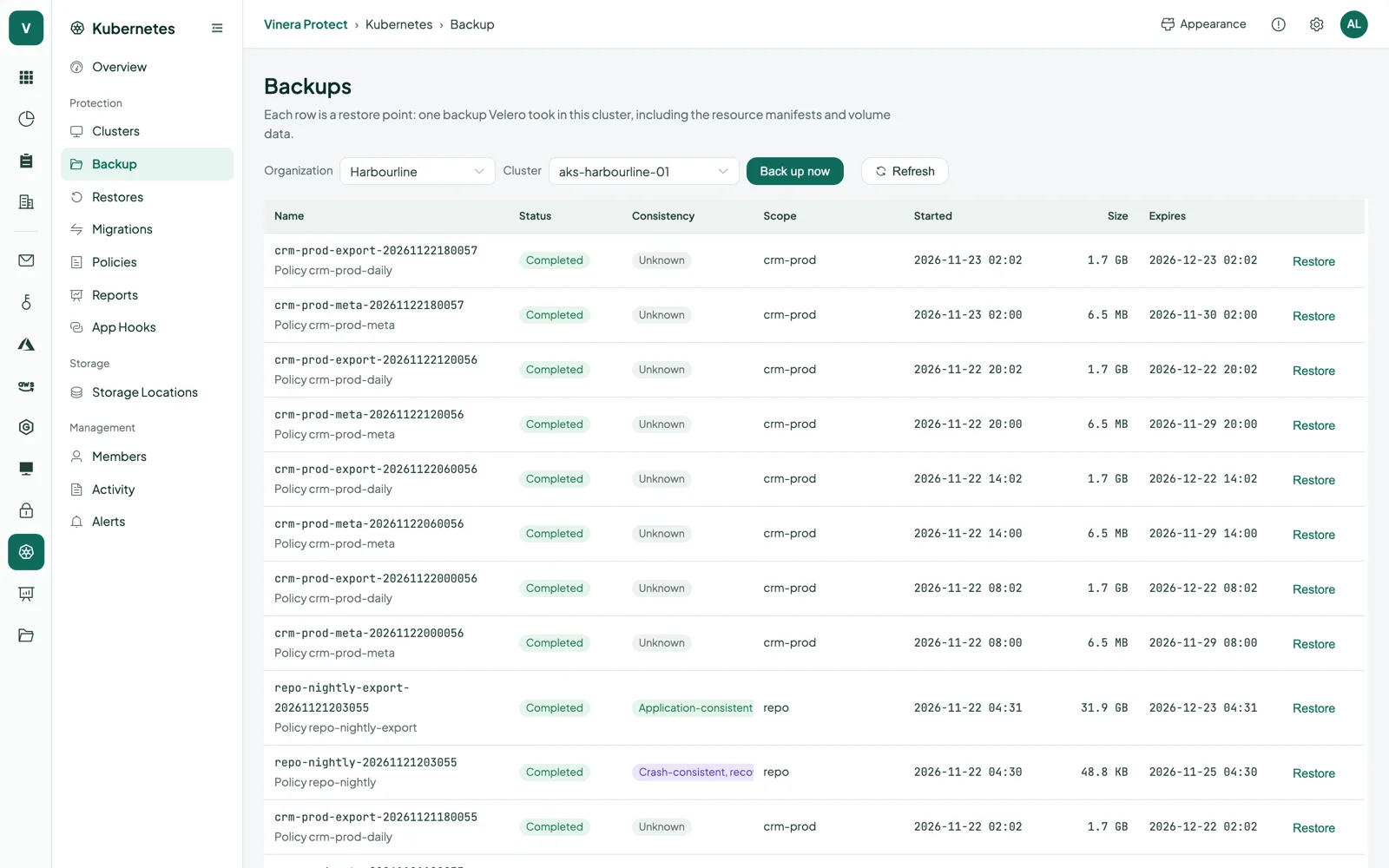
Vinera Protect backs up the namespaces you choose, with their resources and persistent volumes, through an agent in your cluster that works with your own Velero and only connects outwards. Backups go straight to your own Azure Blob or S3-compatible bucket, and you restore a namespace, or move it to another cluster, from one console.
Kubernetes keeps your apps running. It does not keep a copy of them.
Kubernetes works hard to make the cluster match what you declared, and it does that just as faithfully when the declaration is a mistake. Delete a namespace and everything in it goes, often its volumes too. A failed Helm upgrade or a bad migration script changes the data, and the cluster carries on as if nothing happened.
Manifests in Git can recreate your deployments; they cannot bring back the data in a persistent volume. A backup in your own object storage, with restore points you can pick, lets you put a namespace back as it was.
Namespaces, their volumes and the databases inside them.
Namespaces
Protected
All the namespaced resources in the namespaces you pick: workloads, services, config maps, secrets and the rest. One or more namespaces per backup.
Recovery
Restore into a new namespace, or into the original one to add back what is missing.
Persistent volumes
Protected
Volume data taken with a CSI snapshot and copied to your bucket, or kept as a snapshot in the cluster. You choose per backup and per policy.
Recovery
Volumes come back with their namespace, from the restore point you pick.
Databases in the cluster
Protected
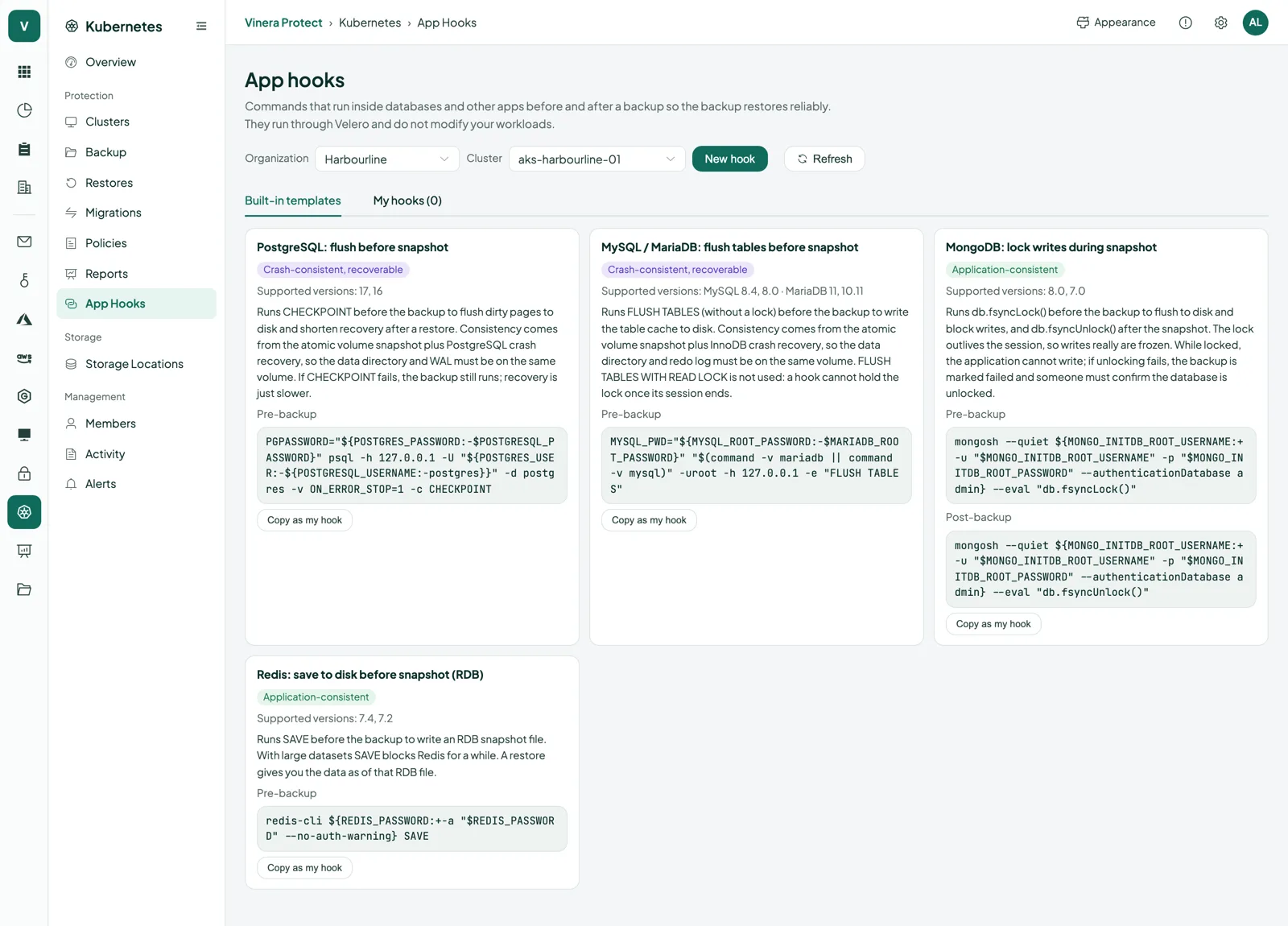
PostgreSQL, MySQL, MariaDB, MongoDB and Redis, with built-in hooks that prepare the database before its volume is captured. Or your own pre-backup and post-backup commands.
Recovery
Each restore point shows its consistency level, and your post-restore commands run once the restore is done.
Moves between clusters
Protected
The namespaces you choose, optionally narrowed by resource labels, backed up as the first step of a migration.
Recovery
Restored on another connected cluster in your organisation, with namespaces renamed and storage classes mapped as you set, then verified.
Velero does the work. You get one console for every cluster.
Outbound-only agent
One Helm command installs the agent. It dials out on port 443; nothing in your cluster accepts connections from Vinera.
Works with your Velero
The agent drives the Velero in your cluster. If Velero is already running, the agent finds it and shows its schedules as policies.
Your own bucket
Azure Blob Storage or any S3-compatible bucket. Data goes from your cluster straight to your bucket.
Volumes with CSI snapshots
By default each volume is snapshotted and its data copied out of the cluster to your bucket.
Database hooks
Built-in templates for PostgreSQL, MySQL, MariaDB, MongoDB and Redis, or your own commands. Hooks run through Velero; your workloads are not changed.
Schedules you set
Every 6 hours, daily, weekly or any cron expression. Pause a policy, resume it or run it now.
Many clusters, one console
Switch between clusters and see which are connected, their worker nodes and their last heartbeat.
Success reports
Backup success rate per cluster and per policy over the last 30 days, with a daily chart for the last 14.
Activity log
Every change, who made it and the result, denied attempts included, kept for 180 days.
Pick the namespaces, set the schedule, decide how long to keep it.
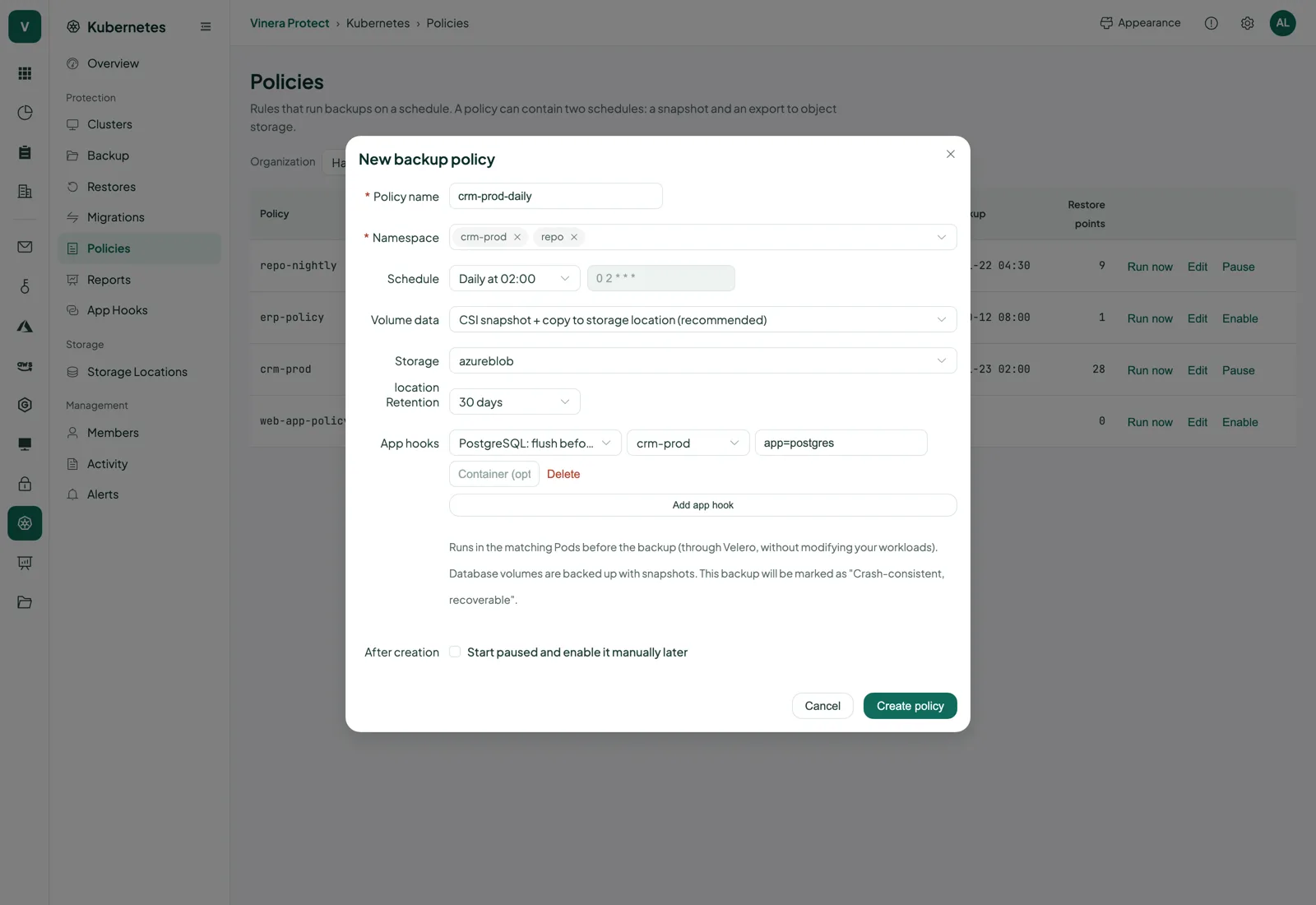
A policy says which namespaces on a cluster to back up, how volumes are captured, when to run and how long to keep each restore point. Set it once; Velero in your cluster runs it.
- Namespaces and volumesChoose one or more namespaces and how their volumes are handled: snapshot and copy to your bucket, snapshot kept in the cluster, or resources only. Add database hooks where you need them.
- A schedule that fitsStart from every 6 hours, daily at 02:00 or Sundays at 02:00, or write your own five-field cron expression. Edit the namespaces and schedule later, pause, resume or run now.
- Retention you chooseKeep policy backups for 7, 30 or 90 days, and on-demand backups for 1, 7, 30 or 90. When volumes are copied out, the snapshot in the cluster is kept for 72 hours and the copy in your bucket for the retention you set.
Back into the cluster, or onto another one.
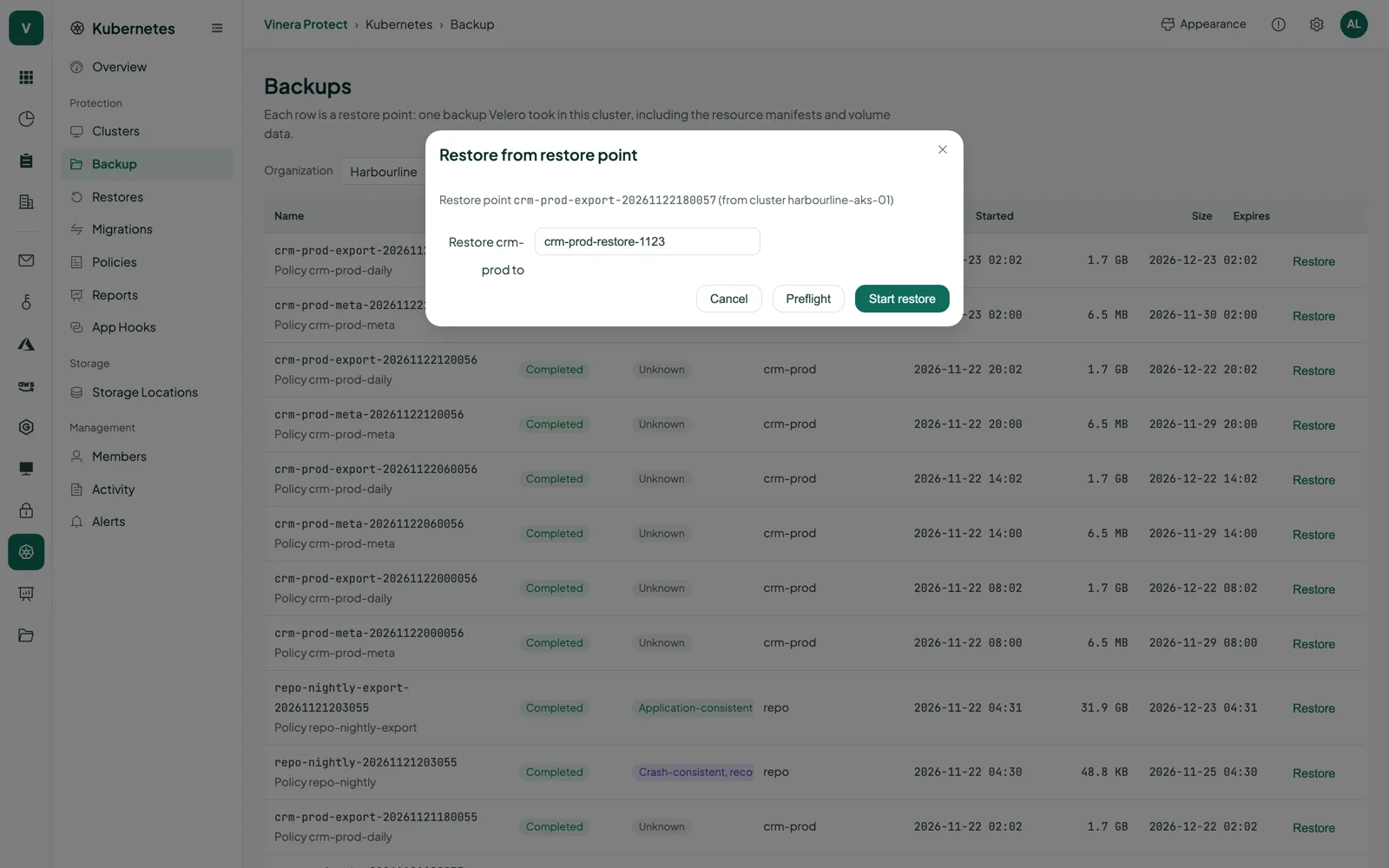
Open any restore point you still keep, choose the namespaces and where they go, and let a preflight check tell you about anything in the way before the restore starts.
- A new namespace or the originalRestore into a new namespace, named for the day unless you choose a name, or into the original one, where only missing resources are added back.
- Checked before it startsThe preflight lists blockers and warnings first, so you can fix them before anything is written.
- Move to another clusterThe Migrations wizard backs up, attaches your storage read-only on the target, syncs, restores and verifies, with a report on bound volume claims and ready workloads.
| What you restore | Where it can go | How |
|---|---|---|
| One or more namespaces | A new namespace in the same cluster | Restore from any restore point, after a preflight check |
| A namespace | Its original namespace | Restore in place; missing resources are added back |
| Persistent volume data | With its namespace | Restored from the copy in your bucket |
| Namespaces, with their volumes | Another connected cluster in your organisation | Migrations wizard: rename namespaces, map storage classes, verify |
| Resources selected by label | Another connected cluster in your organisation | Migrations wizard with resource labels |
Every restore point keeps its own log, errors and warnings.
The moments a backup earns its keep.
“A clean-up script deleted the payments namespace.”
RestoreOpen last night’s restore point and bring the namespace back with its volumes.
“A Helm upgrade broke the database.”
RestoreRestore the namespace from before the upgrade into a new namespace and check the data next to the live one.
“We are moving the app to a new cluster.”
MigrateRun the Migrations wizard, rename namespaces and map storage classes, then read the report on volumes and workloads.
“Who changed the backup schedule last month?”
CheckLook it up in the activity log: who, when, what and the result.
An agent that only calls out. Storage that stays yours.
Protect reaches your cluster only through the agent you install, and your backups and storage keys stay on your side.
- Outbound onlyThe agent runs as non-root and dials out to the console over a secure WebSocket on port 443. Nothing in your cluster listens for Vinera, and Vinera never holds a kubeconfig. The console itself runs over HTTPS.
- Why it can writeBackups and restores create Velero objects and namespaces, so the agent can manage those and read your workloads and volume claims. It reads Secrets only in the Velero namespace and its own, never cluster-wide.
- Storage keys stay in your clusterKeys you enter in the console are passed to the agent and stored only in a Secret in your cluster; Vinera does not keep them. Join codes work once, are shown once and expire after 24 hours.
- Your bucket, your regionBackup data goes from your cluster straight to your own bucket, in the region you chose. Vinera holds none of it, and each cluster’s backups are kept under their own path.
- Kept apart per customerYour clusters, restore points and storage locations belong to your organisation alone. Your sign-in token never enters your cluster.
Three things to have ready.
What you need
- A Vinera account. Your Vinera contact opens a Protect workspace and turns on the Kubernetes module.
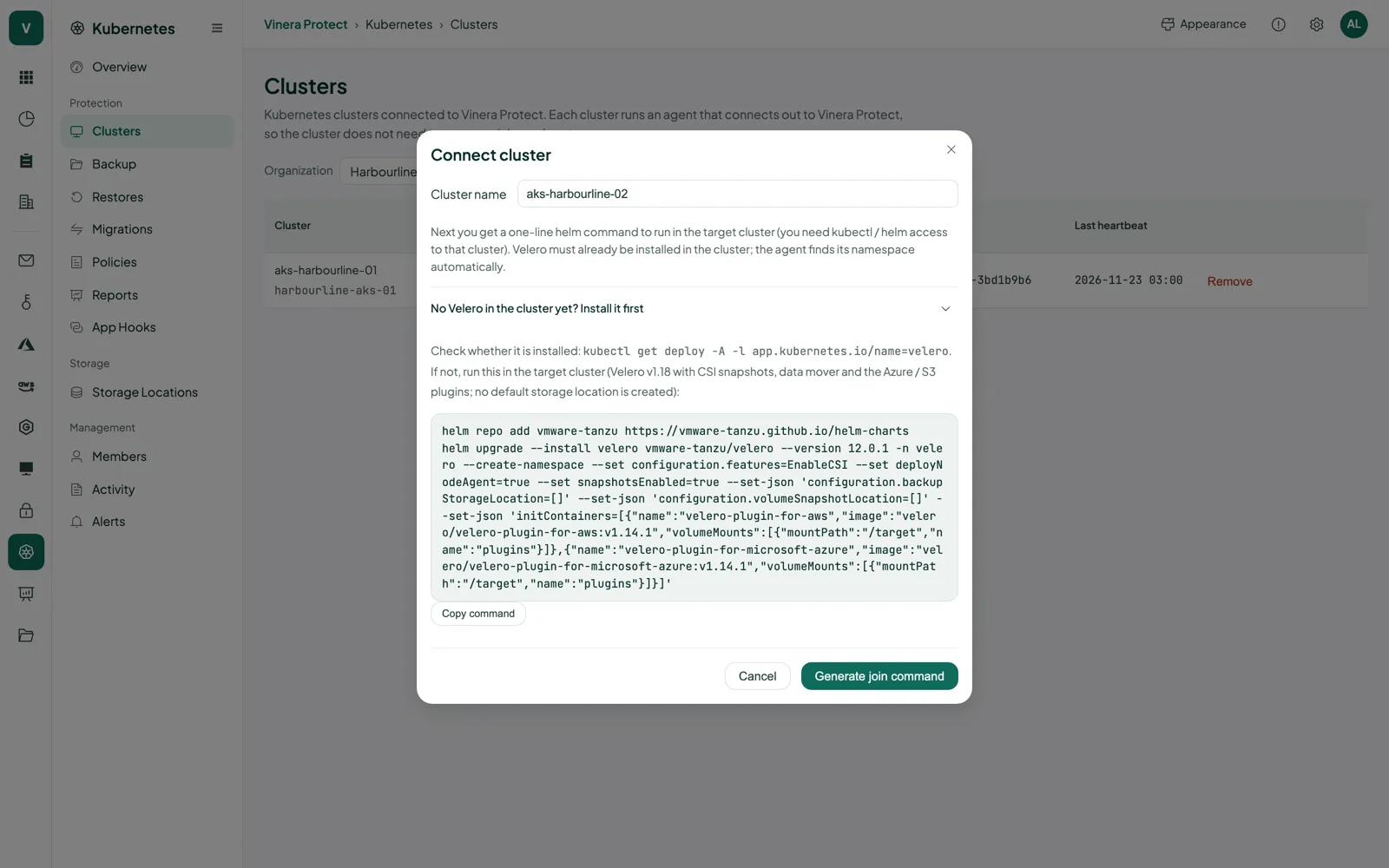
- A cluster with Velero v1.18 and a CSI driver that supports volume snapshots, and Helm access to it. The console shows the Velero install command if you need it.
- An Azure Blob Storage container or an S3-compatible bucket of your own, with its access key.
Then, in three steps
- Connect your cluster. Name it in the console and run the Helm command it shows, with its one-time join code.
- Add storage and set a policy. Point the cluster at your bucket, then choose the namespaces, the schedule and the retention.
- Run your first restore. Restore a namespace into a new one on day one, so everyone knows it works.
Kubernetes backup, in detail.
Screens and the film are real, taken from a demo workspace. All companies and people shown are fictional.
What exactly is backed up?
The namespaces you choose: every namespaced resource in them and the data in their persistent volumes. Add database hooks when a database needs to be prepared first.
Do I need Velero?
Yes. Protect works with Velero v1.18 in your cluster. If it is not installed, the console shows the command, with CSI support, the node agent and the Azure and AWS plugins. If Velero is already running, the agent detects it and lists its existing schedules as policies.
Where has it been tested?
On Azure Kubernetes Service, Kubernetes 1.34.11 and 1.35.5, with the Azure Disk CSI driver.
Where are my backups stored?
In your own Azure Blob Storage container or S3-compatible bucket, in the region you chose. Data goes from your cluster straight there; Vinera holds no backup data and keeps no storage keys.
What access does the agent need?
It manages Velero backups, restores, schedules and storage locations, reads workloads, volume claims and volume snapshots, and can create namespaces for restores. It reads Secrets only in the Velero namespace and its own. It only makes outbound connections.
How are databases handled?
Built-in hooks for PostgreSQL 17 and 16, MySQL 8.4 and 8.0, MariaDB 11 and 10.11, MongoDB 8.0 and 7.0, and Redis 7.4 and 7.2 prepare the database before its volume is snapshotted. You can also add your own pre-backup, post-backup and post-restore commands. Each restore point shows its consistency level.
How long are backups kept?
Policy backups for 7, 30 or 90 days, 30 by default; on-demand backups for 1, 7, 30 or 90 days. Velero removes them when they expire.
How do I get it?
Book a demo. Your Vinera contact opens a Protect workspace with the Kubernetes module; you then connect your clusters, add storage, set policies and run your first restore yourself.
One product, a module for each platform.
See your own cluster backed up.
Book a demo and we will connect a test cluster with you, back up a namespace and restore it into a new one together.